
This update was announced for Violy’s China market. The service figures, features, account changes, coupons, and app-version requirements below describe the offering at the time of the announcement; they are not a statement of current worldwide availability or benefits.
Since launching in November 2020, Violy’s online guided practice service has been supporting you for nearly six years.
More than 1 million lessons have been completed, with teachers spending nearly 50 million minutes helping students practice a variety of instruments online.
Behind these numbers are children who keep showing up to practice with care, and the lasting trust of every parent.
Now, Violy practice lessons are getting a fresh upgrade. The interface is more welcoming, and booking is clearer, too.
The first change you notice: from teal to mango orange
Open the new practice lesson interface, and the first thing you see is its new visual style.
The main color has changed from cool teal to warmer, more energetic mango orange. Cards, buttons, and options have softer, rounder shapes, complemented by cream yellow, white, and light gray to make the pages feel friendlier and more relaxed.
Mango orange is more than decoration: it also provides clear visual cues. Available options, selected states, and the final confirmation button are all highlighted in orange.
This New Version Mainly Upgrades Six Things
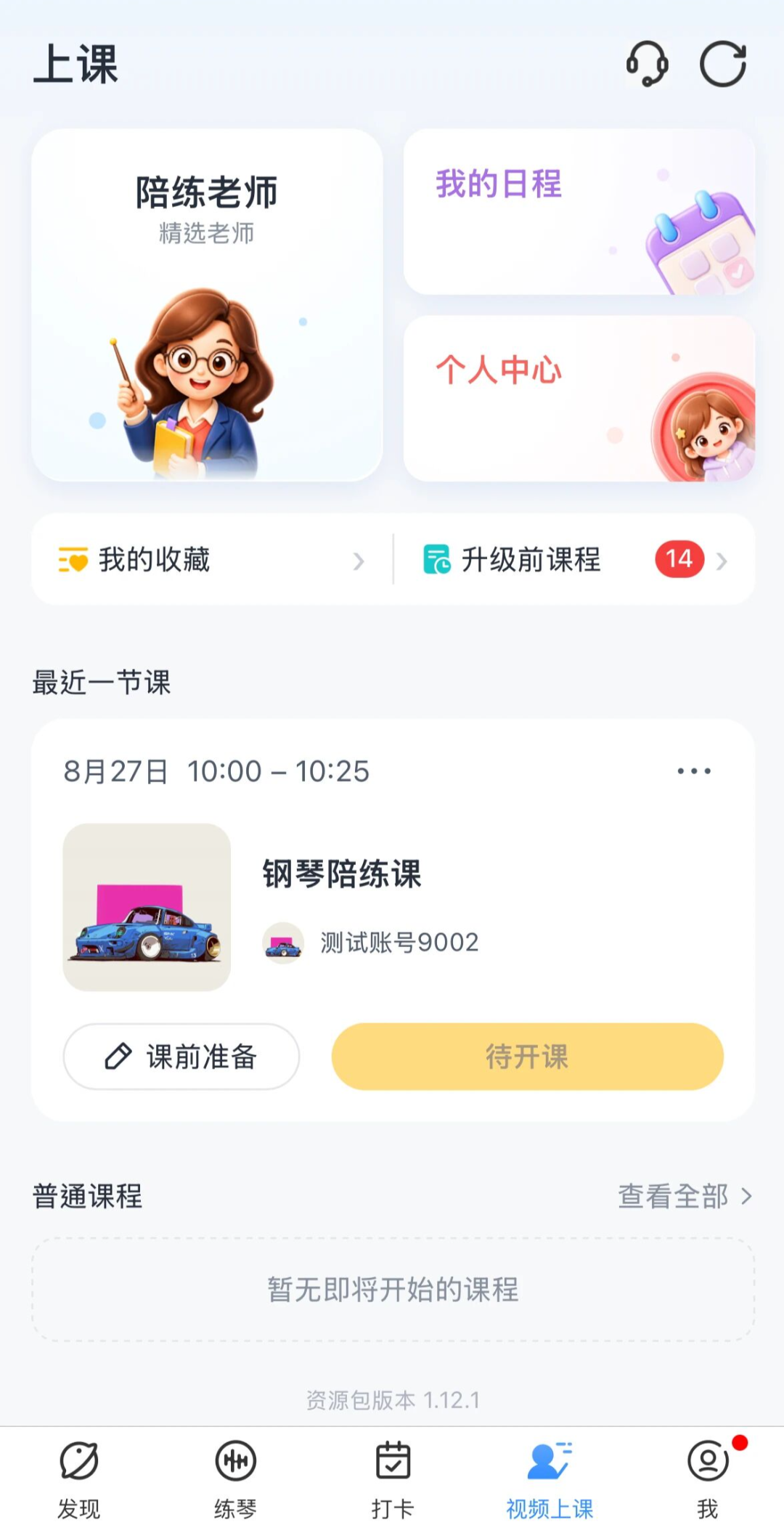
01 | A Reorganized Practice Lesson Home Page Makes Everyday Features Easier to Find
The former “Video Lessons” page has become the new practice lesson home page, bringing the features you use most often together:
- Practice Teachers: browse and choose teachers.
- My Schedule: view booked lessons.
- Account Center: view your balance, coupons, and lesson journals.
- My Favorites: quickly find familiar teachers.
- Pre-Upgrade Lessons: view lessons booked before the upgrade.
Your next upcoming lesson is also displayed more prominently on the home page. It is easier to see whether you have a lesson today and what time it starts as soon as you open the page.
02 | More Complete Lesson Information and a Clearer Booking Process
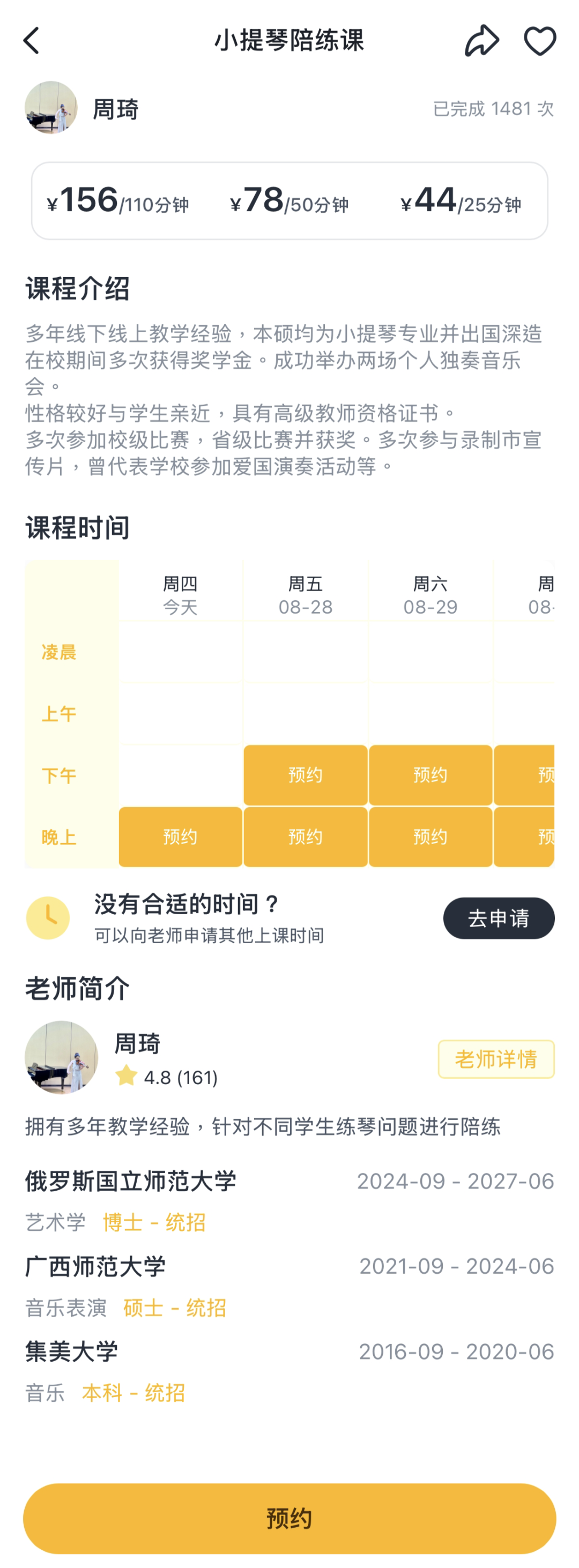
The new version adds more detailed lesson information between choosing a teacher and selecting a booking time.
On the lesson details page, you can see the lesson introduction, supported instruments, prices for different lesson lengths, the teacher’s education and professional background, and available dates and times in one place.
Less searching back and forth, more information you can understand at a glance. Here is the new lesson details page:
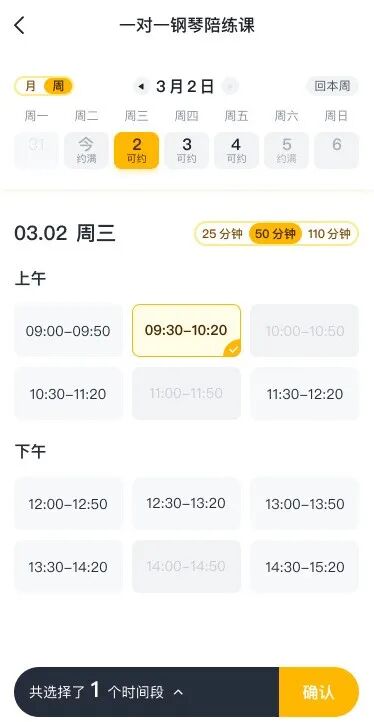
To book a lesson, simply make your selections in this order:
- Choose a teacher and lesson.
- Choose the lesson date.
- Choose a duration of 25, 50, or 110 minutes.
- Choose a suitable lesson time.
- Confirm the booking and pay.
Different colors and styles clearly distinguish available, fully booked, and selected slots. The new filters also let you choose teachers more quickly according to your criteria. Here is the new booking time selection page:
03 | Recurring Lessons Become “Lesson Subscriptions”
- The previous recurring lessons will become more flexible lesson subscriptions.
- Your teacher, lesson time, and existing price stay the same.
- Instead of paying for several lessons in advance, the fee for the next lesson is automatically deducted each week.
- You can view and manage subscriptions under “My Schedule — My Subscriptions.”
- You can request time off when something comes up, or cancel the subscription when you no longer need it.
Ongoing recurring lessons will transition automatically. Lessons already paid for before the upgrade will take place as usual, and the subscription will start automatically afterward. Parents do not need to set anything up again.
04 | Request a Lesson Directly, Even When a Teacher Has No Available Slots
Previously, if a teacher had not made a suitable time available, you often had to send a private message to ask.
The new version adds a “Lesson Request” feature. Parents can select their preferred time on the lesson details or booking page, pay the lesson fee in advance, and submit a request.
The teacher has 24 hours to confirm. If the teacher accepts, the lesson can go ahead as usual. If the teacher declines or the request times out, the lesson fee is refunded in full.
What used to require a private inquiry is now a formal process you can complete within the page, making communication simpler and the outcome clearer.
05 | Practice Journals Become “Lesson Journals”
In the old version, practice journal entries were arranged chronologically, with all content mixed together. The new lesson journals provide a separate record for each lesson.
Each lesson has its own areas for preparation, a post-lesson summary, and lesson communication. Parents and teachers can share text, images, files, and sheet music for that particular lesson, making everything easier to find when reviewing it later.
Practice materials from the previous lesson with the same teacher in the same course can also automatically carry over to the next lesson, reducing repeated uploads.
Your previous practice journals will not disappear. They will remain available in the new system.
06 | Teachers, Lessons, and Account Benefits Carry Over Smoothly
Although the pages and booking process have changed, the teachers, lessons, and account benefits you care about will all be retained:
- Teachers you have booked in the past three months will automatically be added to “My Favorites.”
- You can still view and attend lessons booked before the upgrade.
- Qinbei account credits will be converted to Mangobei credits at equal value, with no change to your balance.
- Unused coupons that have not expired will be retained.
- Historical lesson journals and lesson statistics will be retained.
- You do not need to download a separate app; the new interface is available within the Violy app.
Your teachers, lessons, and balance are unaffected. The upgrade benefits for existing users are shown below:
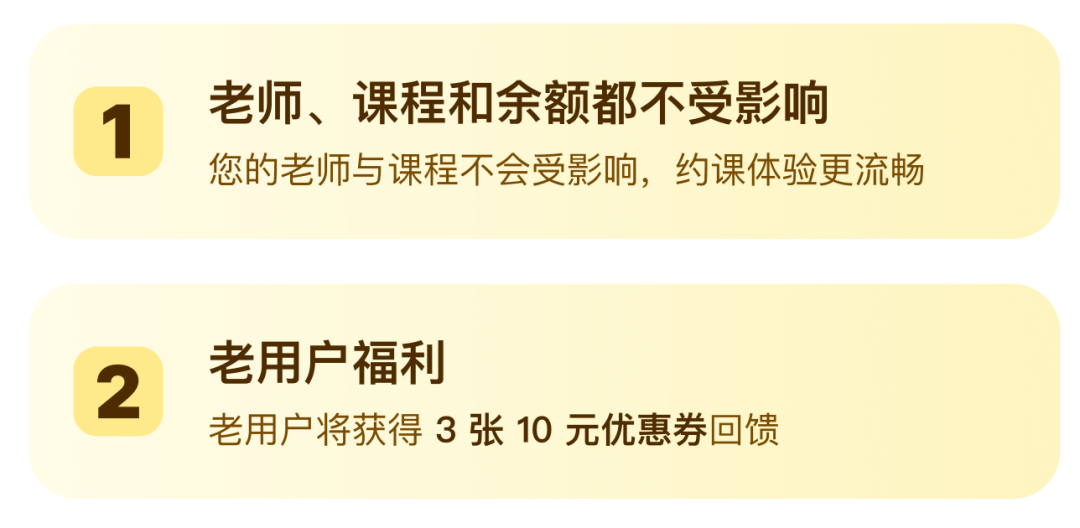
Benefits for Existing Users
To thank existing users for their continued support, the upgrade offer automatically provided three RMB 10 coupons the first time they opened the new practice lesson page after upgrading.
These coupons could be found under “Account Center — Coupons.” They applied to all guided practice lessons, with no minimum spending requirement, and were valid for 30 days after receipt.
Important: Update the App Before Using the New Version
The old version still lets you view and join lessons booked before the upgrade, but it cannot book lessons in the new system.
To avoid interruptions to future bookings, the announcement asked users to update promptly to version 13.21.0.
Every redesign of our practice lessons grows out of real experiences using the service, and depends on feedback from parents and students.
We hope this upgrade makes the pages warmer, the information clearer, and booking simpler, while helping every practice session feel worthwhile.
Thank you for your continued trust and support.
The Violy Team