
Translation note: This guide preserves the features and invitations described in the original Chinese article. Its download and customer-service QR codes, live practice-coaching services, and introductory membership offer refer to the China service as described in that article, rather than a current worldwide offer. The title’s claim of an overwhelming worldwide lead in user numbers is the original article’s promotional claim; the supplied source provides no comparative user figures. The supplied text refers to demonstration videos but contains no video links.
In just a few minutes, this article will help you understand:
What the Violy app is, and why it can help you.
Violy is a practice-assistance app that helps us practice efficiently.
The original article describes Violy as a well-known practice app in China and abroad that had been available for 10 years at the time of writing.
It supports a range of instruments, including piano, violin, cello, viola, digital piano, clarinet, and flute.
The app helps us practice through its resources and features.
-
Resources: The app includes free sheet music and demonstration audio and videos, making it easy to find scores and examples.
-
Features: It offers basic tools such as a metronome and tuner, along with advanced AI assessment and live practice coaching. These features help you check the accuracy of your practice.
First, get your ticket for the journey toward more efficient practice 🚢: download the app.
Download Violy for free:

Press and hold to scan the QR code and download the app.
Welcome aboard! First, let me show you how Violy can help:
Here is the practice routine we recommend:
- Find the sheet music you are practicing in the app.
- Open the score and use playback: watch a demonstration, listen to the performance, and sing the notes along with it.
- Once you are familiar with the score, use Note-by-note mode to check that you are playing the correct pitches.
- After you have practiced the piece thoroughly, use the AI assessment feature, Audition, to check your accuracy and identify and correct mistakes yourself.
- Once your intonation, tempo, and rhythm are in order, use accompaniment to have fun making music.
Throughout this process, you can use the practice check-in feature, which listens to your instrument, to record your practice. You can also have a live coach accompany your practice over video.
The individual features are demonstrated below.
How to search for and use sheet music in the app:
You can use any piece in the sheet music library. Even better, these scores can all be played back!
Next, I will show you how to play back a score and adjust the playback speed.
When you begin a new piece, reading the score, listening to the audio, and singing the notes along with playback can help you become familiar with the music quickly. Watching a demonstration performance video can also help you get started sooner! Many scores support accompaniment, too.
The next video shows you how to watch the demonstration videos attached to a score and how to use accompaniment audio.
Note: At the time of the original article, Violy already supported AI accompaniment, and readers were invited to try it.
Violy had also introduced band accompaniment! According to the original article, band accompaniment had been added for all practice pieces as well.
Once you are familiar with the score and ready to practice,
you can start with Note-by-note mode, practicing one note at a time.
During Note-by-note practice, always pay attention to the cursor position. Unless you play the current note correctly, the app cannot recognize the next note.
Once you are comfortable with the piece, try the Audition assessment feature:
As you play, the app listens to your instrument and gives you a score, showing where you played incorrect notes and where you need to improve.
This is a core Violy feature: using practice data to support a systematic approach to practice.
Beginners may find this feature difficult to master at first. The original guide encourages you to keep trying, expressing confidence that learning to use it will take your playing to the next level. Watch the next video and give it a try!
Using Audition gives you a performance score and generates a practice assessment report.
The basic tuner and metronome are included, too.
If you want to tune your violin, you can watch the video.
Make adjustments slowly and patiently as you tune!
There are many other features in the app for you to explore:
The practice check-in feature,
which tracks actual practice time, counting only when it hears your instrument.
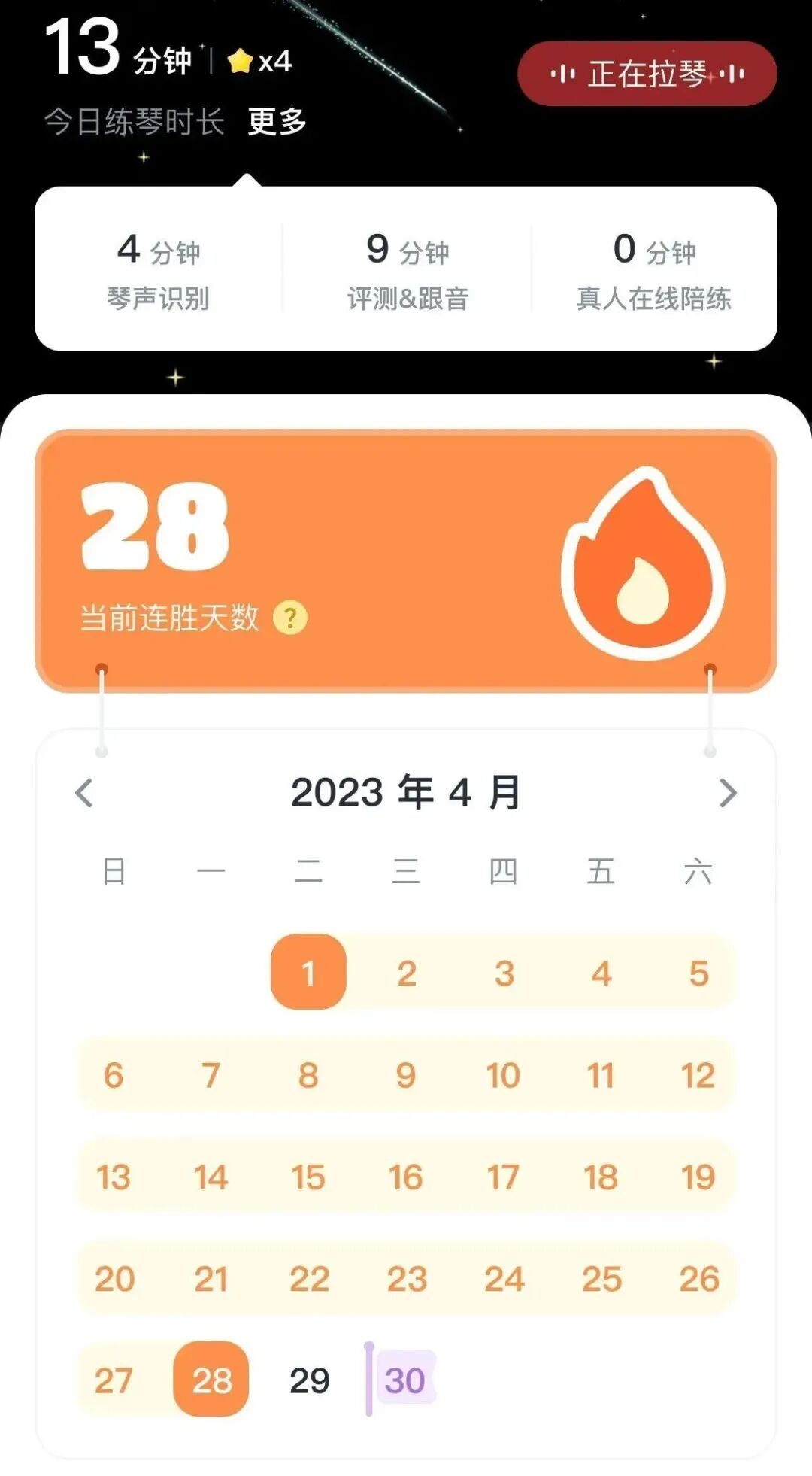
Practice check-in
And the practice check-in streak system:
Earn one star each day by checking in with 10 minutes of instrument practice.
How many days can you keep it up?

In addition,
the original China guide also describes live online practice-coaching sessions in Violy, using one-to-one, two-way video. Teachers were available for various instruments, including violin, piano, and guzheng, a Chinese plucked zither.
For first-time users, the original China offer described an automatically awarded membership that users could claim in the app to explore its features without access restrictions. Live online practice coaching was excluded.
If you have any questions about the app,
the original article invites you to contact the Violy China customer-service team at any time:

Scan the QR code to add Xiaoba, the customer-service contact.
Trying it yourself is better than hearing about it a hundred times. Come and give it a try!